
Download MidGen AI – Free Text‑to‑Image Generator, AI Art Tool
Introduction
MidGen AI is a cloud‑based, text‑to‑image generator that lets anyone turn a simple written prompt into a high‑quality visual in seconds. The service is completely free, requires no registration, and runs directly in any modern web browser, making it an ideal choice for designers, marketers, educators, and hobbyists who need fast, reliable visual content without the overhead of costly software licenses. Under the hood, MidGen AI hosts five purpose‑built AI models—StabilityAI, Absolute‑Realism, EpicPhotoGasm, Realistic‑V6, and Animagin—each tuned for a specific style ranging from photorealistic product renders to whimsical cartoon illustrations.
Because the platform is hosted, all heavy lifting happens on powerful remote GPUs, so users with modest hardware can still benefit from instant generation times. Security is baked into the experience: every request travels over HTTPS, and generated images are stored only temporarily, ensuring privacy for sensitive projects. While the current offering does not include native mobile apps or deep‑level editing tools such as brush or layer controls, its core strengths—speed, variety, and zero‑cost access—make it a compelling addition to any creative workflow.
Whether you’re drafting a social‑media campaign, prototyping a UI mock‑up, or simply exploring artistic concepts, MidGen AI provides a seamless, low‑friction environment for turning ideas into eye‑catching imagery.
Key Features
The feature set of MidGen AI is designed to cover the most common needs of visual creators while keeping the interface uncluttered and intuitive. By offering a range of specialized models, the platform ensures that users can quickly select the aesthetic that best matches their project, without spending time tweaking low‑level parameters. The following list outlines the most important capabilities, each described in enough detail to help readers understand its practical impact.
- Five Dedicated AI Models – Each model (StabilityAI, Absolute‑Realism, EpicPhotoGasm, Realistic‑V6, Animagin) excels at a distinct visual style, from balanced outputs to dramatic lighting and cartoon‑style art.
- Instant Generation – Images are produced within 5‑15 seconds, allowing rapid iteration during brainstorming or client presentations.
- Zero Registration – No email, password, or subscription is required; simply visit the site and start creating.
- Free Access – All models are available at no cost, with no hidden fees or usage caps for standard resolution outputs.
- Web‑Based Interface – Works on any modern desktop browser (Chrome, Edge, Firefox, Safari) without any downloads or installations.
- High‑Resolution Export – Download images as PNG or JPEG up to 2048 × 2048 px, suitable for both digital and print applications.
- Secure HTTPS Processing – All data is transmitted securely, and images are stored temporarily to protect user privacy.
- Weekly Model Updates – The development team releases improvements and new features on a regular schedule, keeping the AI at the cutting edge.
- Multi‑Language Prompt Support – Accepts prompts in English, Spanish, French, German, and several other languages.
- Community Gallery – Users can explore publicly shared creations for inspiration and prompt ideas.
Installation, Usage & Compatibility
Because MidGen AI is fully hosted in the cloud, there is no traditional installation process. Users simply need a stable internet connection and a modern web browser that supports WebGL and HTTPS. The workflow begins by opening a supported browser on any desktop operating system—Windows 10/11, macOS Monterey or later, Linux distributions such as Ubuntu 20.04+ or Fedora 34+, and Chrome OS—all of which provide full functionality without additional plugins. Mobile browsers can load the site, but the desktop‑oriented UI may feel cramped on small screens; for the best experience, a laptop, tablet, or desktop is recommended.
The usage steps are straightforward:
- Open a Supported Browser – Launch Chrome, Edge, Firefox, or Safari.
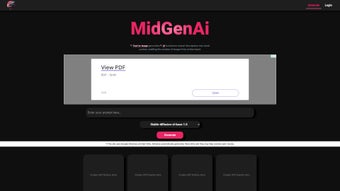
- Visit the Official Site – Navigate to midgen.ai. The homepage presents a clean prompt box, a model selector, and a “Generate” button.
- Select an AI Model – Choose the engine that matches your desired style. Beginners often start with “StabilityAI” for balanced results.
- Enter a Text Prompt – Write a clear description, e.g., “A futuristic city skyline at sunset, ultra‑realistic, high detail.” Adding adjectives like “sharp focus” or “soft lighting” guides the AI toward the intended outcome.
- Adjust Optional Settings – Choose the output resolution (Standard 1024 × 1024 px or High 2048 × 2048 px) and toggle “Safe Mode” if needed.
- Generate the Image – Click “Generate.” A progress bar appears while the server processes the request; within seconds the image is displayed.
- Refine and Regenerate – If the result isn’t perfect, tweak the prompt and click generate again. The rapid turnaround encourages iterative experimentation.
- Download or Share – Use the download icon to save the PNG/JPEG file, or copy a shareable link for collaboration.
- Explore the Community Gallery – Browse publicly shared images for inspiration and prompt ideas.
Because all processing occurs on MidGen AI’s remote servers, users benefit from high‑performance GPU resources without needing a powerful local machine. Network latency is the primary factor affecting speed; a broadband connection of at least 5 Mbps is recommended for smooth operation. For corporate environments, ensure that the domains “midgen.ai” and “cdn.midgen.ai” are whitelisted to avoid firewall blocks.
Pros, Cons & Frequently Asked Questions
Pros
- Completely free with no hidden subscription fees.
- Five specialized AI models covering realism, fantasy, and cartoon styles.
- Instant image generation for rapid prototyping.
- No account creation required, enhancing privacy.
- High‑resolution export options suitable for print and digital media.
- Weekly updates keep the technology current.
- Secure HTTPS transmission and temporary image storage.
- Multi‑language prompt support broadens accessibility.
- Community gallery provides inspiration and prompt ideas.
- Runs on any modern desktop browser—no installation needed.
Cons
- Lacks native mobile apps, limiting on‑the‑go usage.
- Limited creative controls (no brush, layer, or style‑transfer tools).
- Server load during peak times can slow generation.
- No batch processing; each prompt generates a single image.
- Advanced users miss granular parameters such as CFG scale or seed control.
Frequently Asked Questions
Is MidGen AI truly free, or are there hidden costs?
MidGen AI provides all five AI models at no charge. There are no subscription plans, pay‑per‑image fees, or usage caps for standard‑resolution outputs. Future premium tiers may introduce higher‑resolution or commercial‑license options, but the core service remains free today.
Do I need to create an account to use MidGen AI?
No. The platform is designed for instant access—just open the website, type your prompt, and click generate. No email, password, or verification steps are required.
What image formats can I download?
Generated images can be saved as PNG (default) or JPEG. Both retain the full resolution you selected, up to 2048 × 2048 px. PNG is ideal for graphics with transparency, while JPEG works well for photographic content where file size matters.
Can I use the images for commercial projects?
Yes. Images created under the free tier may be used for commercial purposes, provided you comply with MidGen AI’s terms of service. Keeping a record of the image URL and generation date is recommended for future reference.
Why do some outputs appear blurry or less detailed?
Blurriness often stems from ambiguous or overly complex prompts, or from selecting a model that isn’t optimized for the desired style. Simplify the description, add specific adjectives such as “sharp focus” or “high detail,” and choose the model that best matches your visual goal (e.g., Realistic‑V6 for everyday scenes, EpicPhotoGasm for dramatic lighting).
Conclusion & Call to Action
MidGen AI has carved a distinctive niche in the crowded AI‑art market by delivering a fast, free, and user‑friendly solution that requires no installation or registration. Its multi‑model architecture means you’re not locked into a single aesthetic; whether you need photorealistic product renders, cinematic landscapes, or playful cartoons, there’s a dedicated engine ready to interpret your words. The platform’s security‑first approach—HTTPS transmission, temporary storage, and privacy‑centric design—makes it suitable for both personal experimentation and professional projects where data sensitivity matters.
While the absence of native mobile apps and deeper editing controls may disappoint power users, the core experience—instant generation, high‑resolution exports, and a vibrant community gallery—covers the essential needs of most visual creators. For teams that require rapid mock‑ups or solo artists seeking inspiration, MidGen AI offers an unbeatable blend of speed, quality, and cost‑effectiveness. The free‑forever model ensures that anyone, regardless of budget, can access cutting‑edge AI image synthesis without barriers.
Ready to turn your ideas into stunning visuals? Visit midgen.ai now, type your first prompt, and watch the magic happen. Download your AI‑generated artwork today and see how MidGen AI can accelerate your creative workflow.



.png)



